Move from Gorgias
Copy customers, tickets, tags, macros, views and rules from a Gorgias account with an API key, then switch your email and scripts over.
On this page
The helpdesk can copy your history straight out of a Gorgias account. You give it the account's address and an API key, and it reads everything through Gorgias's REST API in the background. Nothing in the Gorgias account is changed, and nothing copied is sent to a customer.
Only admins can start an import and follow its progress.
What comes across#
| From Gorgias | Arrives here as |
|---|---|
| Customers | Customers, with their email addresses and other channels |
| Tickets and their messages | Tickets with every message and internal note, status, priority, tags, assignee and dates as they were |
| Users | Agents with the same role, switched off and not invited |
| Teams | Teams |
| Tags | Tags |
| Satisfaction scores | Scores on the tickets they belong to, so reports include them |
| Macros | Macros |
| Views | Views |
| Rules | Rules, switched off, each with a note saying it was imported |
| Ticket and customer field values | Values, but only for fields that already exist here with the same name |
Attachments come across as links to the files Gorgias stores, not as copies here.
What you set up again#
Ticket fields and customer fields. Create them before you import, with exactly the names they have in Gorgias, and the values on each ticket and customer follow. See Ticket fields.
Your mailbox. Connect Gmail or set up forwarding. See Connect Gmail and Forward email.
Satisfaction survey settings. See Satisfaction surveys.
HTTP integrations, and anything else that called out from Gorgias. See HTTP integrations.
Chat, contact forms and your help center, which are set up fresh. See Set up chat.
Before you start#
In Gorgias, open the REST API settings and copy the API key. Note the email address of the user that key belongs to.
Note your Gorgias address. For
acme.gorgias.com, the part you need isacme.Here, create the ticket and customer fields you want values for, with the same names.
Run the import#
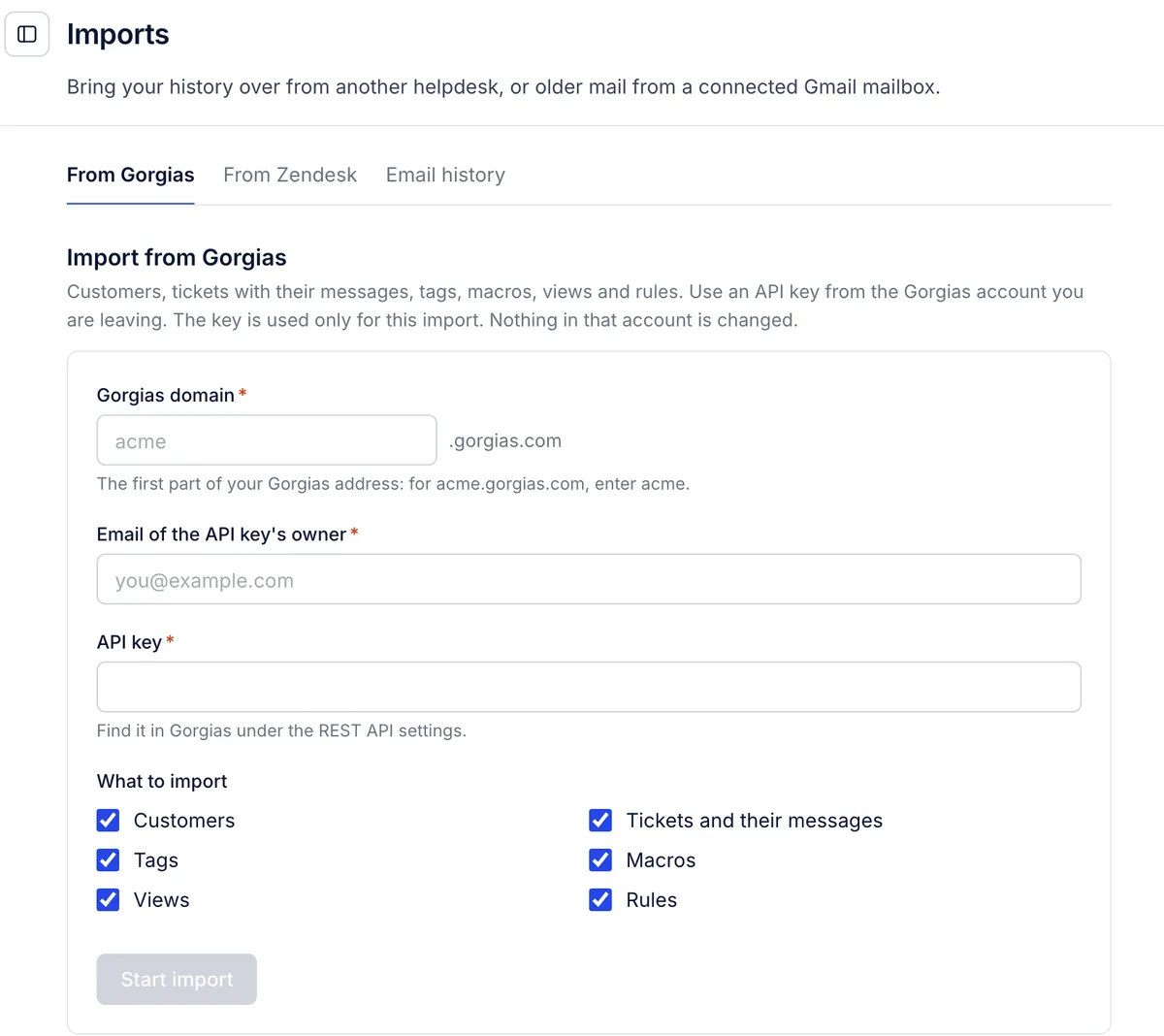
Open Settings > Imports and choose From Gorgias.
Enter the Gorgias domain, the Email of the API key's owner and the API key.
Under What to import, leave everything ticked, or untick what you do not want: Customers, Tickets and their messages, Tags, Macros, Views, Rules.
Choose Start import. You can leave the page; it keeps running.
The Imports list below the form shows each import with its progress part by part. Choose Refresh to update it. A large account takes hours, because the import reads Gorgias a page at a time and waits whenever Gorgias asks it to slow down. Only one import runs at a time; Cancel stops one that is running.
When it ends, its row lists anything worth checking and any item it could not copy, with the reason.
Nothing acts on copied history#
Rules, HTTP integrations and notifications ignore copied tickets.
Imported rules stay switched off until you read each one and switch it on in Workflows > Rules.
Imported agents are switched off and get no invitation. Invite each person when you are ready; their profile and their old tickets are waiting. See Invite your team.
Run it again#
Running the import a second time updates what changed and adds what is new, without copying anything twice. That makes a quiet switch possible:
Run the import a week or so before you move, and set everything up around it.
On the day, connect your support mailbox here, or forward it here, so new mail lands in this helpdesk.
Run the import once more to catch the last tickets answered in Gorgias.
Switch on the rules you want, invite the team and start working here.
Scripts written for Gorgias's API#
The helpdesk's REST API uses Gorgias's paths, field names, list format, paging and sign-in with an email and API key. A script written for Gorgias needs two changes: the base URL and a key made in this helpdesk. There is no subdomain, because the key says which helpdesk it belongs to. See REST API.
From another helpdesk#
Zendesk has its own import. See Move from Zendesk.
Older email in a Gmail mailbox can be brought in with the email history import. See Import email history.
Anything else can be written in through the REST API, or ask support@growthdept.ai and we will help you plan the move.
Related articles
- Move from ZendeskCopy end users, tickets with their replies and notes, tags and macros from Zendesk with an API token, and what stays behind.
- Import older emailBring up to two years of past conversations from a connected Gmail mailbox into the helpdesk as tickets, without sending anything or running rules.
- The REST API and API keysFind your API address, create and revoke keys, and connect your own scripts and tools to the helpdesk, including tools written for Gorgias.
- Launch checklist for adminsThe setup steps in a sensible order, from importing history and connecting email to rules, macros and a test ticket, each linked to its guide.
Still stuck?
Write to the Growth Dept team and a person answers. Say which helpdesk you work in and what you were trying to do.