Haylee, Growth Dept's AI agent
Who Haylee is, what she does in your helpdesk and in Slack, what she never does, and how to ask her for help from any page.
On this page
Haylee is the AI support agent Growth Dept gives every brand on the helpdesk. She drafts replies for your team to send, leaves internal notes, tags and sorts tickets, and writes skills from the way your team answers. You can ask her for help in Slack or from the Ask Haylee button in the helpdesk.
She works through her own account in your helpdesk, so everything she does shows her name: in the ticket history, on her drafts and notes, on the skills she writes and in the reports.
Video coming: Haylee builds it for you. Asking Haylee in Slack for macros, rules, tags and fields, and checking what she made.
What she does#
Drafts replies. When someone asks, she reads the ticket, the customer's other tickets and the store details she is allowed to look up, follows the skills that fit and leaves a draft marked "by Haylee". A person reads it and sends it.
Leaves internal notes. She writes down what she checked and what a person needs to do, for example a refund she would propose.
Tags and sorts tickets. She adds tags, sets priority and hands tickets to a team when a skill tells her to and her actions allow it.
Writes skills. She turns the way your team already answers into skills, and suggests changes to skills that are on. Both wait for a lead agent or admin.
Answers questions about your helpdesk, such as how many open tickets are about returns, from the tickets themselves.
Builds what you ask for: macros, views, rules, tags and ticket fields, for you to check.
Her account has the bot role, which ranks with the agent role, plus a narrow extra grant for building. She can create and edit macros and views, and create and edit rules and ticket fields, but never delete any of them. A rule she creates is saved switched off; she cannot switch a rule on or change a rule that is on. A field she creates or changes stays optional. Someone on your team reads what she made: an admin switches rules on and makes fields required, and a lead agent or admin deletes a macro or view that is not wanted.
What she never does#
She does not send a reply a customer receives unless an admin sets the Send a reply action to Does it in AI Agent > Actions. It is off by default.
She does not refund, cancel or replace an order, change an address or resend a confirmation unless that action is set to Does it. Out of the box she leaves an internal note proposing it, and a teammate does it.
She does not switch her own skills on, unless an admin allows it on the AI agent account page.
She does not invite people, delete customers, or change helpdesk settings, users or API keys.
She does not put customer names, emails, phone numbers, addresses, order numbers or message text in Slack. In Slack she uses counts, descriptions and links to tickets, which only signed-in teammates can open.
Ask Haylee from the helpdesk#
The Ask Haylee button sits at the bottom of the navigation on every page.
Click Ask Haylee.
Type a question or a request, such as "how many open tickets are about returns?" or "draft a skill from how we answer address changes".
Press Enter to send. Shift Enter starts a new line.
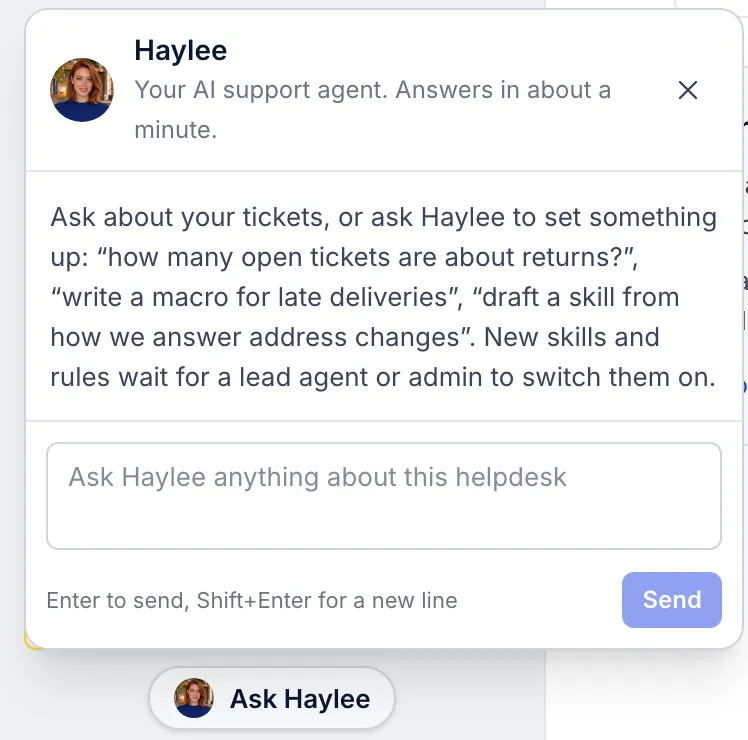
Haylee usually answers within about a minute. While she works the panel shows Waiting for Haylee… and then Haylee is working on it…; you can Cancel a question until she answers. If she cannot do what you asked, for example because it needs a person or an action is set to Asks a person, she says why in a sentence or two.
A few things to know:
If you ask from a ticket, she knows which ticket you were on, so "draft a reply here" works.
The panel shows only your own questions and her answers to them. Teammates do not see what you asked.
You can have up to five questions waiting at a time.
Observers can open the panel but cannot send questions.
If Haylee is not linked yet, the panel says so and links to the AI agent account page, where an admin links her.
Haylee in Slack#
Growth Dept adds Haylee to a Slack channel for your team; for most brands it is a private channel called #growthdept-cs. Mention her to ask for something. She replies in Slack with what she found or made, and links to it in the helpdesk so you can check it.
Change her name#
The name appears on her drafts, notes and skills in your helpdesk. Customers do not see it on drafts: a teammate sends each draft under their own name.
Open AI Agent > AI agent account. Only admins can change it.
Type the new name in Name, up to 60 characters.
Click Save.
Changing the name here does not rename her Slack app; ask Growth Dept if you want that changed too.
Related articles
- How the AI Agent worksWhat the AI Agent does in your helpdesk, what each drafted reply is built from, and how your team stays in charge of everything a customer reads.
- Link or unlink the AI agent accountGive Haylee her own account and key in your helpdesk, replace the key, choose whether her skills need approval, or remove her access.
- Actions and what Haylee may doThe actions library, the 15 built-in actions in your helpdesk and Shopify store, and how to choose for each one whether Haylee does it, asks a person or leaves it alone.
- Slack alerts for new ticketsPost a message to a Slack channel whenever a ticket arrives, using a Slack incoming webhook and an HTTP integration.
Still stuck?
Write to the Growth Dept team and a person answers. Say which helpdesk you work in and what you were trying to do.