Actions and what Haylee may do
The actions library, the 15 built-in actions in your helpdesk and Shopify store, and how to choose for each one whether Haylee does it, asks a person or leaves it alone.
On this page
An action is one thing Haylee can do: tag a ticket, hand it to a team, refund an order, or a series of steps your team put together, such as asking your returns app for a label and leaving the link in a note. A skill says when an action is needed; AI Agent > Actions says whether Haylee does it herself. Every action has one of three settings:
| Setting | What Haylee does |
|---|---|
| Does it | Takes the action when a skill calls for it. |
| Asks a person | Writes what she would do in an internal note, and a teammate does it. |
| Off | Leaves the action alone. |
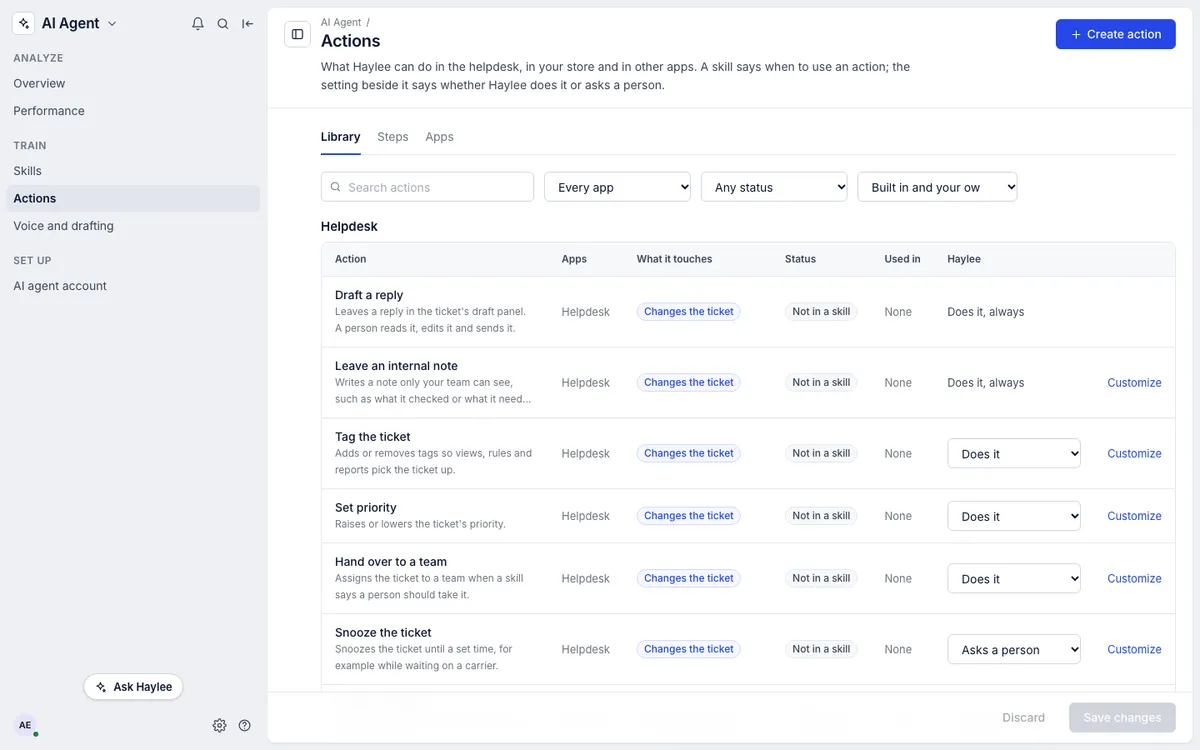
Anyone can read the page. Only admins change it: pick a setting in the Haylee column, then click Save changes, or Discard to undo. For an action your team built, open it and change the setting there.
Find an action#
The library lists the built-in actions under Helpdesk and Shopify, and your own under Built by your team. Search by name, or narrow the list by app, by status or by who made it. Each row shows:
| Column | What it says |
|---|---|
| Apps | Where the action acts: the helpdesk, your store, or an app you added |
| What it touches | Reads only, changes the ticket, reaches the customer, or moves money or stock |
| Status | In use: a switched-on skill names it. Not in a skill: nothing names it yet. Off. Needs setting up: something is missing, such as a connected store or an app's key; the row says what. Last run failed: open the action's event log |
| Used in | How many skills name it. Hover to see which. An action of your own that is on but in no skill says By its description: Haylee may use it when its description fits a ticket |
Customize beside a built-in action starts a new action of your own with the same step, which you can rename and give more steps, information to collect and conditions. The built-in action stays as it is. See Build an action.
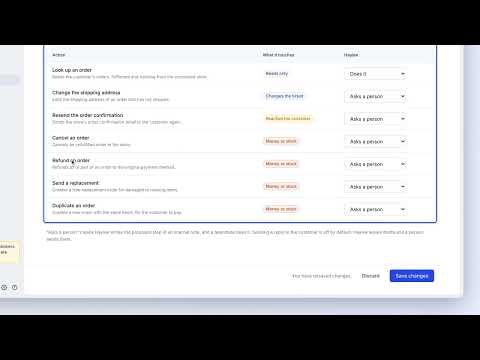 3. Actions for Haylee
Actions in the helpdesk#
| Action | What it touches | Out of the box | Settings you can choose |
|---|---|---|---|
| Draft a reply | Changes the ticket | Does it | Always on |
| Leave an internal note | Changes the ticket | Does it | Always on |
| Tag the ticket | Changes the ticket | Does it | Does it, Off |
| Set priority | Changes the ticket | Does it | Does it, Off |
| Hand over to a team | Changes the ticket | Does it | Does it, Asks a person, Off |
| Snooze the ticket | Changes the ticket | Asks a person | Does it, Asks a person, Off |
| Close the ticket | Changes the ticket | Asks a person | Does it, Asks a person, Off |
| Send a reply | Reaches the customer | Off | Does it, Asks a person, Off |
Drafting and notes cannot be switched off: they are how Haylee shows her work, and nothing in them reaches a customer. Send a reply is different: it sends a public reply that nobody on your team has read first.
Actions in your Shopify store#
These need a store connected under Settings > Store. See Connect your Shopify store.
| Action | What it does | Out of the box | Settings you can choose |
|---|---|---|---|
| Look up an order | Reads the customer's orders, fulfilment and tracking | Does it | Does it, Off |
| Change the shipping address | Edits the address on an order that has not shipped | Asks a person | Does it, Asks a person, Off |
| Resend the order confirmation | Has Shopify email the order to the customer again. Shopify sends it as an invoice, so only for an order with money still owing | Asks a person | Does it, Asks a person, Off |
| Cancel an order | Cancels an order that has not been fulfilled | Asks a person | Does it, Asks a person, Off |
| Refund an order | Refunds all or part of an order to the original payment method | Asks a person | Does it, Asks a person, Off |
| Send a replacement | Creates a free replacement order for damaged or missing items | Asks a person | Does it, Asks a person, Off |
| Duplicate an order | Creates a new order with the same items for the customer to pay | Asks a person | Does it, Asks a person, Off |
Store actions run the same way for Haylee as for a teammate: the helpdesk first works out exactly what will happen, such as the refund amount, then carries it out and leaves an internal note saying what was done. Refunds, cancellations and free replacements also follow the store's own setting for who may run them. Haylee's account ranks as an agent, so she can run those only when that setting lets agents run them and her action is set to Does it. Refund, cancel, duplicate and replace orders explains each action and its limits.
What "Asks a person" looks like#
When a skill reaches an action set to Asks a person, Haylee leaves an internal note on the ticket saying what she would do and why, for example that an order qualifies for a replacement under your damaged-items skill. A teammate reads the note and does it, or not. The note is the request; nothing else waits on it. For an action your team built, the teammate runs it from the ticket: More (the three dots), then Run an action.
How the settings are enforced#
The helpdesk itself checks every setting on this page against Haylee's account. It refuses a public reply unless Send a reply is set to Does it, a store action unless that action is set to Does it, and a tag, priority, team, snooze or close change unless that action allows it. This holds whatever a skill says.
An action your team built has its own setting. When it is Does it, its steps run even where the matching built-in action is set to Asks a person: switching the action on is how an admin allows exactly those steps, with its conditions. Refunds, cancellations and replacements still follow the store's own rule for who may run them.
Teammates are not affected by this page. What a person can do depends on their role.
Use actions in a skill#
In the skill editor, Insert an action… places the action's name in the step where it belongs, such as [Action: Look up an order], and ticks it under Actions it uses. The skill says when; this page says whether she may. A step that refunds an order produces a note proposing the refund while Refund an order is set to Asks a person. See Writing skills that work.
See what Haylee did#
On the ticket. Her notes, tags, priority changes and drafts appear in the ticket's history under her name. After a store action, the helpdesk adds an internal note saying what was done.
In reports. AI Agent > Performance counts her changes by type: tags added, notes written, tickets handed to a team, closed or snoozed, skills written. See AI Agent performance report.
In the audit log. Settings > Audit log lists changes with who made them, and Haylee's carry her name: skills she wrote, drafts she left or withdrew. Only admins can open it. See Audit log.
What is not available#
Store actions that remove or swap single items on an order are not available; the agent edits the order in Shopify instead. An action of your own can call any app with an HTTP API, but not one that only works inside a browser.
Related articles
- Build an actionPut steps together into an action of your own, with the information Haylee collects first, conditions, the customer's agreement and a setting for what Haylee may do.
- Steps and apps for actionsConnect your returns, subscription or shipping app with its key, and write HTTP steps that call it and read values from its answer.
- Run actions and read the event logRun an action from a ticket, see every run with each step's request and answer, and see which skills use an action.
- SkillsCreate, switch on, change and archive the skills that tell drafted replies and Haylee how your team handles each kind of request.
Still stuck?
Write to the Growth Dept team and a person answers. Say which helpdesk you work in and what you were trying to do.