Act on many tickets at once
Select tickets in a view and close, reopen, assign, tag, apply a macro, change priority, mark read, mark as spam or trash them together.
On this page
Bulk actions change a batch of tickets in one step: clearing out a run of spam, closing every "thanks!" reply after a busy weekend, or moving a pile of wholesale enquiries to the right team. Anyone who can reply to tickets can use them.
Select tickets#
Tick the box on each ticket you want, in the list beside a ticket or in the table layout.
From the keyboard, move with J and K and press X to tick or untick the highlighted ticket.
Tick Select all, or press Shift A, for every ticket on the page.
In the table layout, after selecting the page, a link offers to select every ticket in the view, with the count. Changes to a whole view run in the background and can take a minute; a notice says when they started.
As soon as one ticket is ticked, a bar of actions appears above the tickets. Clear unticks everything.
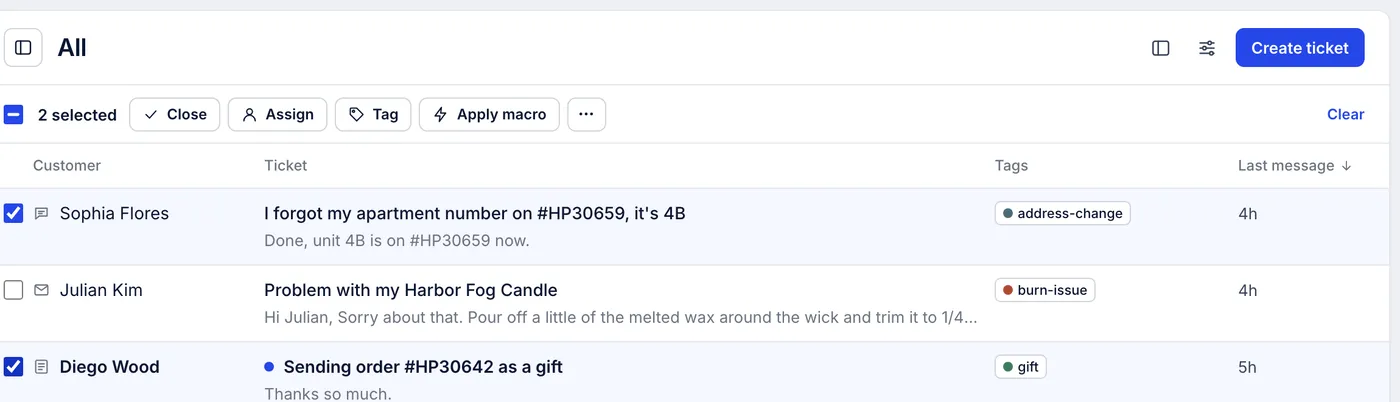
What you can do#
| Action | Where | Notes |
|---|---|---|
| Close or Reopen | First in the bar | Shift C closes the selection. Reopening also ends any snooze |
| Assign | Bar | Pick an agent or a team, or remove either |
| Tag | Bar | Search for a tag or type a new one. For a whole view, select the page instead, or tag with a rule |
| Apply macro | Bar | Runs the macro on each ticket, actions included. Replies go out as the job works through them |
| Mark as read / Mark as unread | More actions (⋯) | |
| Set priority | More actions, table layout | Low, Normal, High or Critical |
| Mark as spam | More actions | Moves them to the Spam view |
| Move to trash | More actions | Asks you to confirm first |
In the list beside a ticket the bar is narrower, so most actions are icons or sit under ⋯. Setting priority is only in the table layout.
The list updates as soon as you act. A notice confirms how many tickets changed; for Close, Reopen, Mark as spam and Move to trash it has an Undo button. If some tickets could not be changed, for example because a required ticket field blocks closing, the notice says how many.
What bulk actions do not do#
Snoozing several tickets at once is not available. Apply a macro that snoozes, or snooze them one by one.
Export in the table's menu is greyed out: exports run from Analytics, where you choose the columns and date range. See Filters and exports.
Tickets cannot be deleted for good from the ticket list. Move to trash hides them; deleting is only possible through the REST API.
Related articles
- The inbox: views, the ticket list and the ticket panelWhat each part of the inbox shows, what the built-in views contain, how the ticket list sorts and refreshes, and the two list layouts.
- Assign tickets to agents and teamsGive a ticket an owner and a team, take one yourself, hand it back, assign many at once, and what assigns tickets without anyone choosing.
- Create and manage macrosWrite a saved reply once, apply it from any ticket, and keep the macro list tidy with search, filters, archiving and duplicates.
- Keyboard shortcutsEvery key the helpdesk responds to, for moving through views, working a ticket and sending replies without the mouse.
Still stuck?
Write to the Growth Dept team and a person answers. Say which helpdesk you work in and what you were trying to do.