Chat with Haylee in the Assistant
Ask Haylee about your helpdesk or have her build macros, rules, skills and actions, in chats that keep their history, with her changes proposed for your approval first.
On this page
The Assistant is where you work with Haylee, your helpdesk's AI agent, in conversation. Open it from the product menu at the top left, or click Ask Haylee at the bottom of the left sidebar on any page for a smaller panel that continues your latest chat.
Every role can chat with Haylee. She can do only what her own account allows, whoever asks: see Actions and what Haylee may do. Nothing she does in a chat reaches a customer.
What to ask#
Your tickets: "Which open tickets have waited longest for a first reply?", "Summarise this ticket and what we already tried", "Tag the open tickets about returns and give them to the Returns team".
Reports: "How did last week compare with the week before?", "Which tags grew this month?".
Building: "Write a macro for customers who want to cancel", "Add a rule that marks requests to collaborate as spam", "Draft a skill for warranty claims from how we answer them", "Create an action that reads a customer's points from our rewards app".
Checking her work: "Which of my skills fit the fewest tickets?", "Why did my action Send a return label fail last time?".
Rules she creates are saved switched off, skills start as drafts, and actions start off. An admin or lead agent reads them and switches them on.
Start a chat#
On the Assistant's home, type what you need and press Enter, or pick a topic (Support, AI Agent, Workflows, Routines) and click one of its examples to fill the box. The chat opens and shows Waiting for Haylee until she answers.
Haylee runs on your brand's own machine and picks up new messages within about a minute; a longer request can take a few minutes. You can leave the page: the chat is saved and her answer appears when you come back. The page checks for it every few seconds while you have it open.
The home page also shows three figures to start from: open tickets, open tickets with nobody assigned, and how many of Haylee's drafts your team used in the last 7 days.
Ask first or go ahead#
Under the message box, choose how Haylee handles changes for that message:
| Mode | What she does |
|---|---|
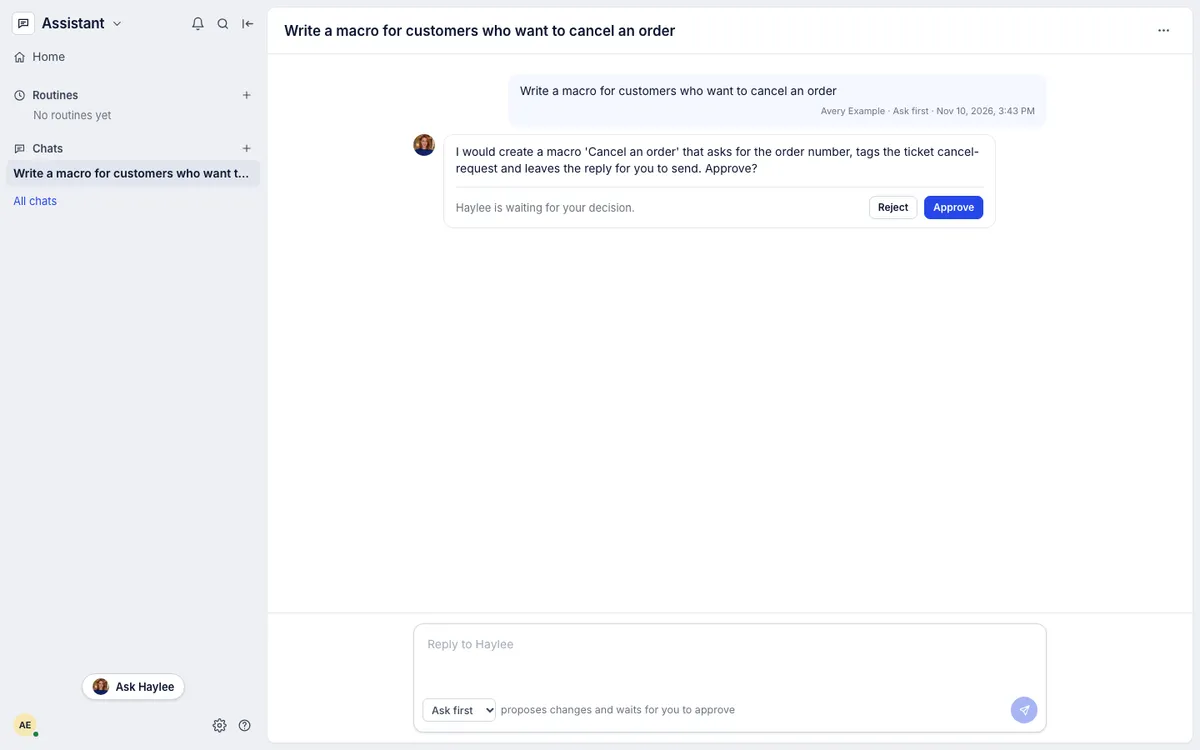
| Ask first (the default) | Answers questions straight away. Before she creates or changes anything, she describes exactly what she would do and waits |
| Go ahead | Makes the change within her own rules, then says what she did |
In Ask first, a proposal ends with Approve and Reject. Approve tells her to make exactly that change. Reject lets you say what should be different; she makes no change and suggests something else. The chat stays open for follow-up questions either way.
Manage your chats#
Chats in the left sidebar lists your recent chats; All chats shows every one, with search. From a chat's menu (the three dots at the top right):
Rename it.
Share with the team: everyone in the helpdesk can then open the chat and add to it. Stop sharing makes it yours again. Only the person who started a chat renames, shares or deletes it.
Copy link to send a teammate to it.
Delete it. It leaves your history and a message still waiting is withdrawn. Changes Haylee already made stay.
Limits#
You can have up to five messages waiting for Haylee at once.
You cannot attach files. Paste the text, or name the ticket and she reads it.
Haylee remembers a chat's earlier messages, not other chats. Things she should always know belong in a skill.
If no AI agent is linked, the Assistant says so. An admin links one under AI Agent > AI agent account; see Link or unlink the AI agent account.
Related articles
- RoutinesHave Haylee answer the same question on a schedule, such as a Monday summary or a morning check for upset customers, and carry on from each answer.
- Haylee, Growth Dept's AI agentWho Haylee is, what she does in your helpdesk and in Slack, what she never does, and how to ask her for help from any page.
- Actions and what Haylee may doThe actions library, the 15 built-in actions in your helpdesk and Shopify store, and how to choose for each one whether Haylee does it, asks a person or leaves it alone.
- SkillsCreate, switch on, change and archive the skills that tell drafted replies and Haylee how your team handles each kind of request.
Still stuck?
Write to the Growth Dept team and a person answers. Say which helpdesk you work in and what you were trying to do.