Urgency settings
Tune how the helpdesk scores each open ticket's urgency from 0 to 100, using waiting time, your tags, customer phrases, channels and reply targets.
On this page
Every open ticket gets an urgency score from 0 to 100 and a band: Urgent, High, Normal or Low. The score is the sum of named reasons, such as "Waiting more than 4 business hours" or "Legal or chargeback language", each worth a set number of points. No AI model is involved, so the same ticket always gets the same score and every point can be explained.
Agents see the band on urgent and high tickets in the ticket list, and the band with its score at the top of each ticket. Hovering the badge lists every reason with its points, how long the customer has waited and when the reply is due. Sorting a view by Urgency (AI triage) puts the most urgent tickets first. See Priority and urgency for how agents use it.
You shape the score on Workflows > Triage and AI drafts. This page covers the urgency part; the AI drafts section at the top is explained in Drafting, tone and language.
Who can change it#
Admins change these settings and press Save changes at the bottom. Other roles can read them. Every points box takes a whole number from −50 to 50. After a save, open tickets are scored again within a few minutes.
Urgency bands#
Set the score where each band starts. The defaults are Urgent from 70, High from 45 and Normal from 20; anything below the normal line is low. Each band has to start above the one below it.
Waiting time#
The longer a customer has been waiting on your answer, the more points the ticket gets. Waiting counts from the customer's latest message that nobody on your team has answered yet; replies from rules and bots do not stop it.
| Waiting more than | With Count business hours only | With Count every hour |
|---|---|---|
| Step 1 | 1 business hour: 8 points | 2 hours: 8 points |
| Step 2 | 2 business hours: 14 points | 6 hours: 14 points |
| Step 3 | 4 business hours: 20 points | 12 hours: 20 points |
| Step 4 | 8 business hours: 28 points | 24 hours: 28 points |
| Step 5 | 16 business hours: 36 points | 48 hours: 36 points |
Count business hours only is the default: nights, weekends and holidays from Settings > Business hours and holidays add nothing. If your business hours have no open time at all, every hour counts.
Customers who matter most#
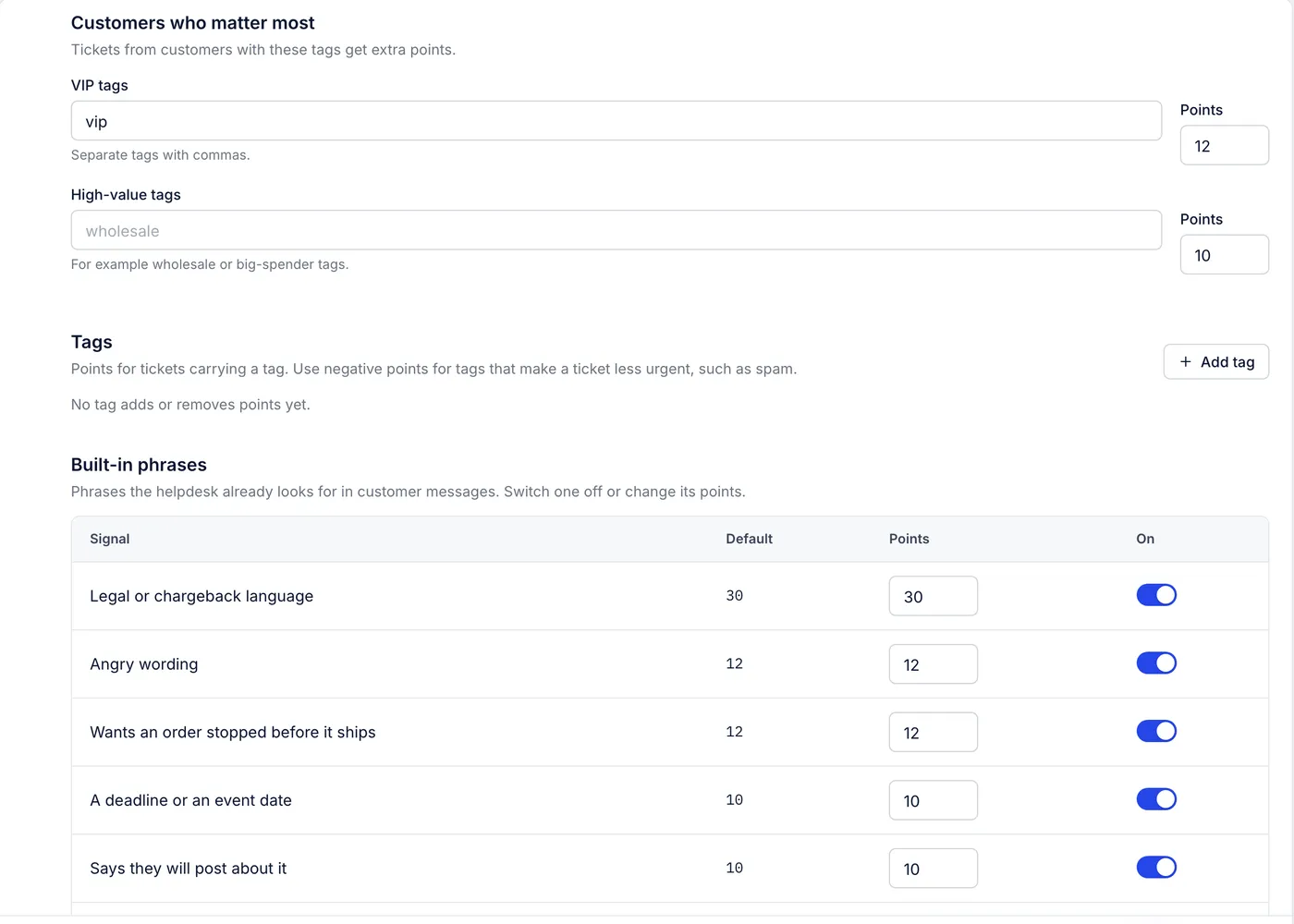
VIP tags: tickets from customers carrying any of these tags get the Points beside them. The default is the tag
vipfor 12 points.High-value tags: the same for big spenders or wholesale accounts, for example
wholesale. None by default; 10 points when you add some.
Both look at the ticket's tags and at the customer's tags in your connected Shopify store. Separate several tags with commas.
Tags#
Press Add tag to give a tag its own points, with an optional Note that appears as the reason on the ticket. Use negative points for tags that make a ticket less pressing, such as spam or feedback.
Built-in phrases#
The helpdesk looks for these in the subject and the customer's latest message. Switch any of them off, or change their points, in the Points and On columns.
| Signal | Default points | Examples of what it catches |
|---|---|---|
| Legal or chargeback language | 30 | chargeback, disputing a charge, calling the bank, PayPal claim, lawyer, small claims, fraud |
| Angry wording | 12 | unacceptable, ridiculous, furious, worst, scam, never again |
| Wants an order stopped before it ships | 12 | cancel my order, before it ships, don't ship |
| A deadline or an event date | 10 | urgent, asap, need it today, wedding, vacation, trip |
| Says they will post about it | 10 | leave a review, social media, tell everyone |
| Reports damage or a defect | 8 | damaged, broken, defective, torn, stained |
| Missing or wrong item | 8 | missing, wrong size, never arrived, didn't receive |
| Asking where the order is | 6 | where is my order, no update, lost package, stuck in transit |
| Says they have written before | 8 | third time, still waiting, following up |
Your own phrases#
Press Add phrases for words that matter to your store, such as competitor price matches or a product recall.
Name: shown as the reason on the ticket, such as "Price match".
Code: a short id of lowercase letters, digits,
-and_. It is filled in for you.Points: what the group adds.
Phrases: separated by commas, each 2 to 60 characters, up to 50. They match whole words and ignore capitals, so
price matchfinds "Price Match?" but not "price matched".
Live channels#
Customers on chat and other live channels expect faster answers. For each channel, Points adds to every ticket on it, and Reply target (minutes) sets when a waiting customer counts as late if no SLA policy covers the ticket.
| Channel | Default points | Default reply target |
|---|---|---|
| Chat | 8 | 15 minutes |
| Phone | 8 | 15 minutes |
| SMS | 8 | 60 minutes |
| 8 | 60 minutes | |
| Instagram direct message | 4 | 120 minutes |
| Messenger | 4 | 120 minutes |
Email has no row: it takes its reply target from your SLA policies. The page marks every row "Not connected yet"; chat tickets do use the Chat row, and the others wait for channels the helpdesk does not have.
Points the helpdesk adds on its own#
These have no setting, but they show as reasons on the ticket.
| Reason | Points |
|---|---|
| Past its reply target (from an SLA policy, a live channel target, or the band's own target) | 15 |
| Reply due soon | 6 |
| Marked critical / high / low priority | 15 / 10 / −5 |
| Two or more tickets from the customer in 7 days | 10 |
| Two or more customer messages with no reply | 8 |
| Reopened after being closed | 8 |
| Open 3 days / 7 days or more | 6 / 12 |
| 6 messages / 10 messages or more long | 6 / 10 |
| The customer's past satisfaction scores average 3 or lower | 8 |
| The latest message is mostly written in capitals | 8 |
| The AI-drafted reply is unsure of its answer | 6 |
When no SLA policy or live channel target applies, a waiting ticket's reply is due 1 hour after the customer wrote for urgent tickets, 4 hours for high, 12 for normal and 24 for low, counted in business hours when the waiting clock is.
Limits on the score#
The score never goes below 0 or above 100.
A ticket where your team replied last can be no higher than Normal, however many points it has: "Held at normal: we replied last".
Snoozed tickets show as Low until the snooze ends, and closed tickets are always Low.
Spam, tickets in the trash and automated mail (out-of-office replies, delivery notices and the like) get no urgency at all.
Intents and sentiment#
The helpdesk does not label tickets with a detected intent ("return request") or a sentiment ("negative"). Use the signals above instead: Angry wording and your own phrase groups raise urgent tone, and rules can tag tickets by the words customers use so views and reports can group them.
Related articles
- Priority and urgencyThe priority you set on a ticket, the urgency score the helpdesk works out for every open ticket, and the reasons behind each score.
- Service level targets (SLAs)Set how fast your team should first reply to and resolve each kind of ticket, and see where those targets already shape the urgency of open tickets.
- TagsLabel tickets by topic so views, rules, macros and reports can find them, and keep the tag list tidy with descriptions, colours and merges.
- Drafting, tone and languageWhere drafted replies appear on a ticket, the drafting switches, how to describe your team's voice, and how the AI Agent hands over, tags, closes and works with rules.
Still stuck?
Write to the Growth Dept team and a person answers. Say which helpdesk you work in and what you were trying to do.