Snooze a ticket
Set a ticket aside until a time you choose, what brings it back early, where snoozed tickets are listed, and how to wake one up.
On this page
Snooze a ticket when you are waiting on something that is not the customer: a carrier's investigation, a restock date, an answer from your warehouse. The ticket leaves your open views and comes back by itself at the time you pick.
Snooze it#
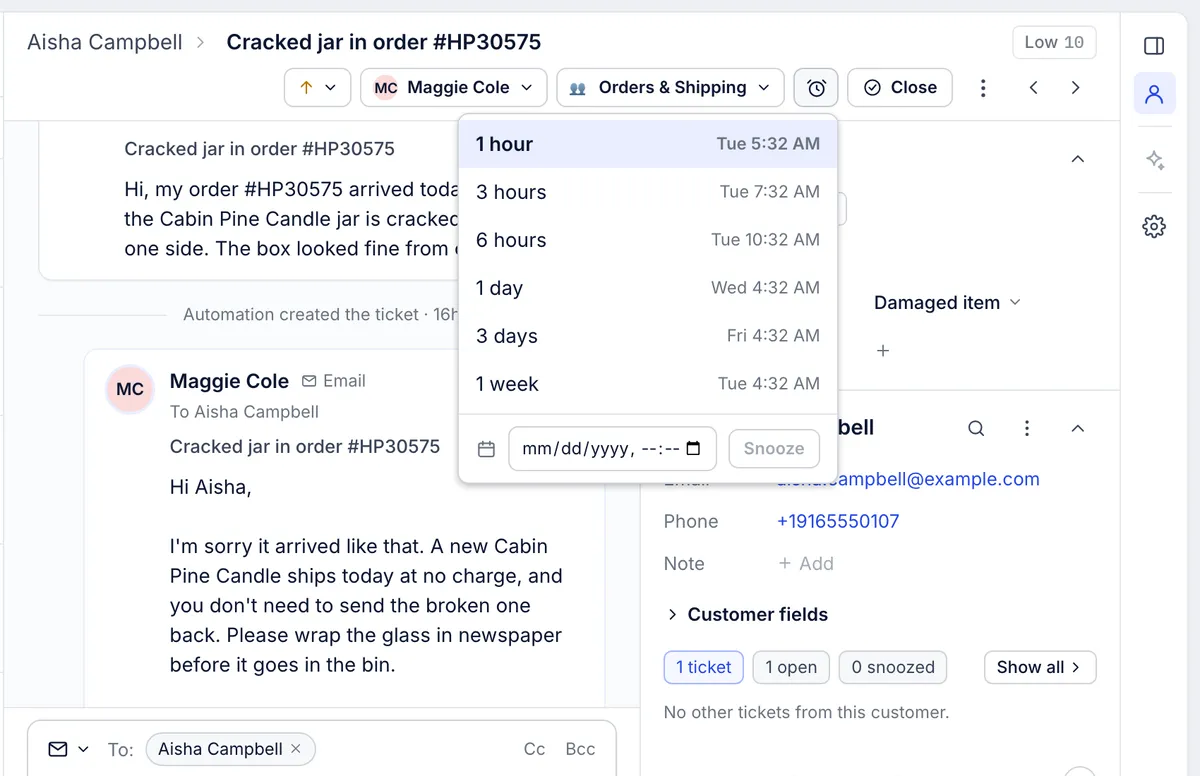
On the ticket, click the alarm clock button beside Close, or press B.
Pick a preset. There are six, from 1 hour to 1 week, and each shows the day and time it ends.
Or, under Snooze until a date and time, choose a date and time and click Snooze.
The ticket now shows Snoozed until with the end time under the subject, and the alarm clock button is highlighted.
What happens while it sleeps#
The ticket is closed with a wake-up time, so it drops out of Assigned to me, Unassigned, All and any view that lists open tickets.
It is listed under More > Snoozed if it is assigned to you, and under More > Closed for everyone.
Hovering over the alarm clock button shows when it ends.
What brings it back#
| Event | What happens |
|---|---|
| The time you picked arrives | Within about a minute the ticket opens again, marked unread, with a grey line saying the snooze ended |
| The customer writes in first | The snooze ends at once, the ticket opens and is marked unread |
| Someone chooses Wake it up now in the snooze menu, or Reopen | It opens straight away |
Your own reply does not end a snooze. If you answer while it is snoozed, the ticket stays asleep until its time.
To hear about it when your snoozed ticket wakes up, switch on the email for A ticket I snoozed opens again in Settings > Notifications. See Notifications.
Snooze from a macro or rule#
A macro can snooze the ticket as part of sending a reply, which suits answers such as "I have asked the carrier and will update you within three days". Rules can snooze too. See Macro actions and Rule conditions and actions.
Snoozing many tickets at once from the ticket list is not available; snooze them one by one, or apply a macro that snoozes to all of them with bulk actions.
Related articles
- Work a ticket from first read to closeReading the conversation and its events, the four ways to answer, Cc and attachments, sending, closing and reopening, and the spam, trash, print and link actions.
- The inbox: views, the ticket list and the ticket panelWhat each part of the inbox shows, what the built-in views contain, how the ticket list sorts and refreshes, and the two list layouts.
- Macro actionsWhat a macro can change on a ticket when the reply goes out, how to set each action up, and what to use for jobs a macro cannot do.
- NotificationsThe bell, the emails you can get about tickets and mentions, the daily summary of open tickets, and what admins set for new agents.
Still stuck?
Write to the Growth Dept team and a person answers. Say which helpdesk you work in and what you were trying to do.