Writing skills that work
How drafts choose a skill, how to word the steps so drafts follow them, and what to check when a draft ignores a skill or gets it wrong.
On this page
A good skill reads like instructions you would hand a new teammate on their first day: one situation, the decisions in order, and what to do at the end of each branch. This page explains how drafts pick a skill and how to write one they follow.
 2. Skills for Haylee, your AI agent
How a draft picks a skill#
The helpdesk does not ask an AI model which skill applies. It compares words:
It takes the ticket's subject and the customer's newest message.
For each active skill, a word that also appears in the skill's Name or When to use it scores 2 points. A word linked to one of its Intents it covers scores 1. Words such as "returns", "returned" and "returning" count as the same word.
The three highest-scoring skills go to the draft in full. The names of the other active skills go along too, so the draft knows they exist.
A skill that shares no words with the ticket is left out.
The draft then reads the three, follows the one that fits the customer's newest message, and lists it under What this draft was written from.
What this means for you:
Write When to use it in your customers' words. "Where is my order", "tracking hasn't moved", "still not here" match far better than "WISMO inquiries".
Keep one situation per skill. A skill covering returns, exchanges and refunds at once scores well on many tickets and fits none of them exactly. Split it.
Give skills names that differ. Two skills called "Order issues" and "Order problems" compete for the same tickets.
Write the steps#
Number the steps in the order a person would do them, and write each decision as "If ..., then ...". Add a step in the editor adds the next number.
Finish every branch. Each "if" needs a "then": what to tell the customer, what to tag, or who takes over. A branch that ends with "it depends" leaves the draft guessing.
Say what not to promise. "Do not give a delivery date for a replacement" or "do not offer store credit unless the customer asks" keeps drafts inside your policy.
Name the team. "Hand it to the Returns team" works; "escalate" does not say to whom.
Put store facts in brackets until you know them. A draft treats
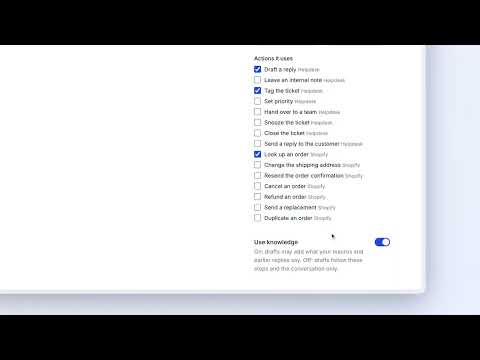
[RETURN WINDOW]as a fact it does not have and leaves a gap for the agent instead of inventing a number.Put actions where they happen. Insert an action… drops the action's name into the step, such as
[Action: Look up an order], and ticks it under Actions it uses. Haylee reads it as the moment to use that action, within what AI Agent > Actions allows her.Keep customer details out. No names, emails, addresses or order numbers, not even as examples. Steps reach every draft for that situation.
Here is a short skill written this way:
1. Find the order
- If the customer has not said which order, then [Action: Look up an order] and use the most recent one.

2. Ask for a photo
- If there is no photo of the damage yet, then ask for one and stop there.

3. Offer a fix
- If the photo shows the damage and the order total is under [AMOUNT], then offer a replacement and leave an internal note asking a teammate to send it.
- If the total is [AMOUNT] or more, then say a teammate will reply within [TIME] and hand the ticket to [TEAM].

4. Limits
- Do not promise a date for the replacement to arrive.
Knowledge on or off#
Use knowledge decides whether a draft may add what your macros and earlier replies say.
Leave it on for most skills. Drafts borrow wording and details from replies your team has already sent.
Turn it off when the steps must be followed exactly, for example a legal or safety process, or a policy that changed so recently that older replies would mislead. With it off, the draft uses only the steps and the conversation. This applies when the skill is the best match for the ticket.
What a skill cannot do#
Give built-in drafts order details. Built-in drafts do not read your store's orders, so they cannot state where a parcel is. Haylee can, when Look up an order is set to Does it. Otherwise the agent checks the order in the ticket sidebar before sending.
Overrule what your team already promised. If a teammate offered a refund earlier on the ticket, the draft keeps that promise even if the skill says otherwise.
Set the tone. Tone, sign-offs and words to avoid belong in How your team writes on the Voice and drafting page, where they apply to every draft. Keep skills about what to do.
Make Haylee do something her actions do not allow. A step that refunds an order still only produces a proposal in an internal note while Refund an order is set to Asks a person.
Send a macro. Drafts may borrow a macro's wording when knowledge is on, but a skill cannot attach one. If the macro's content matters, write it into the steps.
When a draft gets it wrong#
Open What this draft was written from under the draft first: it shows the skills, macros and earlier tickets the draft used, with the ones it followed in bold.
| What you see | What to check | What to change |
|---|---|---|
| No skill listed at all | Is the skill on the Active tab? Does When to use it share any words with the customer's message? | Switch it on, or add the words customers use |
| A different skill was followed | Do two skills cover the same situation? | Narrow When to use it on one of them, or merge them |
| The draft skipped a step | Is the step a long paragraph with several decisions? | Break it into separate "If ..., then ..." lines |
| A gap marked Fill in before sending | Is a bracket still in the skill? | Fill the bracket in the skill, so the next draft has the fact |
| The draft added something your policy does not allow | Is Use knowledge on, and do older replies say something different? | Add a limit to the steps, or turn knowledge off |
There is no rating button on drafts. Discarding a draft is recorded, and AI Agent > Performance shows for each skill how many of the drafts that followed it were used or discarded. A skill whose drafts are often discarded is the one to rewrite. You can also ask Haylee to propose the change: "drafts for address changes keep asking for the order number twice; update the skill". Her change waits for a lead agent or admin to accept.
Related articles
- SkillsCreate, switch on, change and archive the skills that tell drafted replies and Haylee how your team handles each kind of request.
- What drafts know about your businessEvery source a drafted reply reads, what it never sees, and how to give drafts the facts they are missing.
- Drafting, tone and languageWhere drafted replies appear on a ticket, the drafting switches, how to describe your team's voice, and how the AI Agent hands over, tags, closes and works with rules.
- Try the AI Agent before you rely on itCheck how skills and drafts behave on real tickets before your team leans on them, and what the AI Agent does on chat.
Still stuck?
Write to the Growth Dept team and a person answers. Say which helpdesk you work in and what you were trying to do.