Voice of Customer
See what customers write about in a period, against the period before, and ask Haylee to read the tickets and report the themes with what to do about them.
On this page
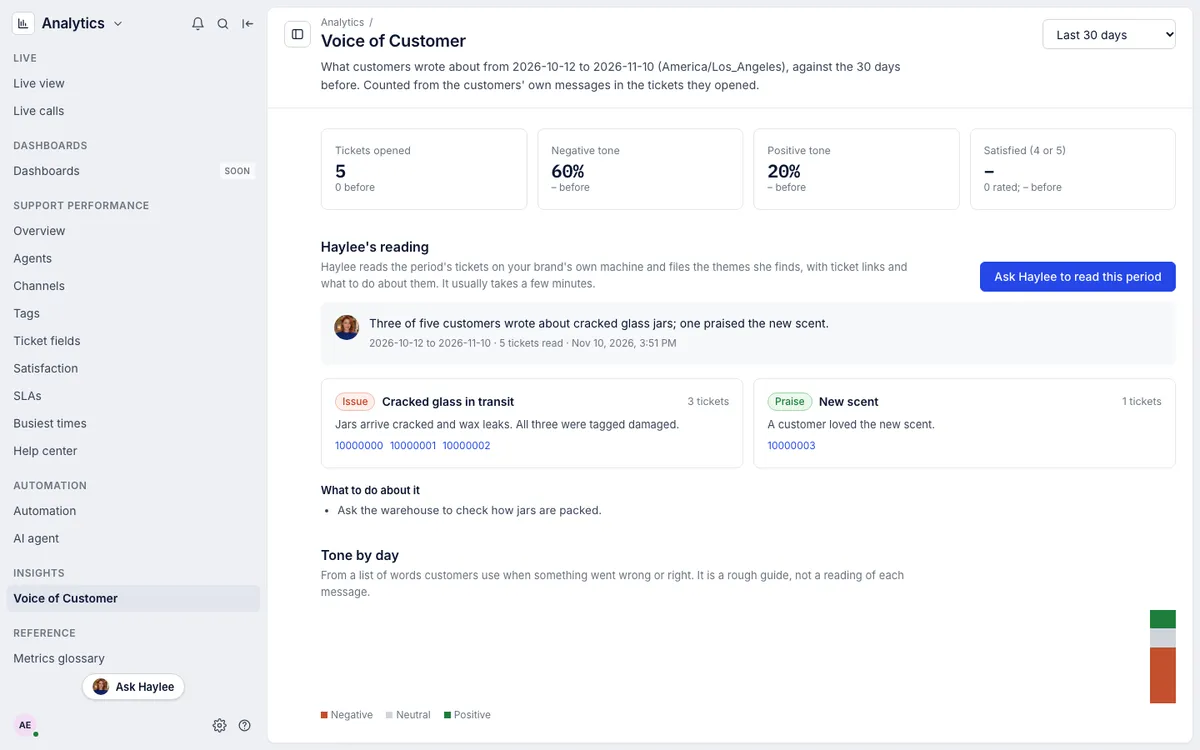
Analytics > Voice of Customer shows what customers wrote about in the tickets they opened, so you can spot a product problem, a confusing policy or a run of praise without reading every ticket. Choose the last 7, 30 or 90 days at the top right; every figure is compared with the same number of days before. Days follow the helpdesk's time zone.
The page reads two ways. The figures are counted from the tickets each time you open it. Haylee's reading is her own report of the same period, which you ask for.
The figures#
Tickets opened, Negative tone, Positive tone and Satisfied (4 or 5) from the satisfaction survey, each with the period before.
Tone by day: tickets opened each day, split into negative, neutral and positive.
Products customers name: the products customers mention in their own words, how that changed, and how many of those tickets read as negative. Product names come from the orders of your connected store.
Contact reasons from the contact reason field when your helpdesk has one, otherwise Tags, with the count before and the change.
On the rise: words and pairs of words that appear in at least three tickets and grew most against the period before. Click one, or a product, to search the tickets for it.
Only the customers' own messages are read: not your replies, notes or automatic messages. Tickets marked as spam, in the trash or deleted do not count. A period with more than 5,000 tickets counts the first 5,000 and says so.
Haylee's reading#
Click Ask Haylee to read this period. Haylee reads the period's tickets on your brand's own machine and files a report, usually within a few minutes:
a short summary;
themes, each marked as an issue, a request, praise or a question, with the number of tickets, links to examples and the products involved;
recommendations tied to the themes.
While she reads, the page says so and links to the chat that carries the request in the Assistant, shared with your team. You can ask follow-up questions there. One report runs at a time. If she cannot finish, the page says why.
To get a report every week, set up a routine in the Assistant, for example "Every Monday, read last week's tickets and tell me the main themes". See Routines.
Who can see it#
Everyone in the helpdesk can open Voice of Customer and ask for a report. Ticket links open only for people who can see those tickets. If no AI agent is linked, the figures still work and the page says how to link one.
Related articles
- Tags reportSee which tags come up most, how many tickets carry no tag, and how quickly and how well each kind of ticket is resolved.
- Satisfaction reportRead your average survey score, the share of happy customers, how many answered the survey, the split of scores from 1 to 5 and their latest comments.
- Chat with Haylee in the AssistantAsk Haylee about your helpdesk or have her build macros, rules, skills and actions, in chats that keep their history, with her changes proposed for your approval first.
- RoutinesHave Haylee answer the same question on a schedule, such as a Monday summary or a morning check for upset customers, and carry on from each answer.
Still stuck?
Write to the Growth Dept team and a person answers. Say which helpdesk you work in and what you were trying to do.